
Product · Human resources
OPTimes. From the clocking terminal to the payslip, in the cloud.
The human resources platform we are deploying at ONATRA SA: attendance by fingerprint, palm, facial recognition or RFID badge, salary calculation and payslips. We also supply the hardware, install it, and manage it remotely.
- 7,700+Staff tracked on one deployment
- 4Modes: fingerprint, palm, face, badge
- < 5 minTo generate the month's payroll
- ZKTeco · HikvisionHardware supplied, installed, supervised
What OPTimes does
Hardware, attendance, payroll — one chain.
Most organisations buy a clocking terminal from one supplier and payroll software from another, then spend the year copying between the two. OPTimes holds the whole chain: we install the terminals, they report into the platform, and payroll is calculated on actual attendance.
Biometric attendance
- Fingerprint and palm reading
- Facial recognition
- RFID badge, for roles where biometrics are impractical
- One person can be enrolled on several modes at once
Hardware
- Supply and installation of ZKTeco and Hikvision kits — a service we also sell on its own
- Remote fleet management: commands sent without travelling to site
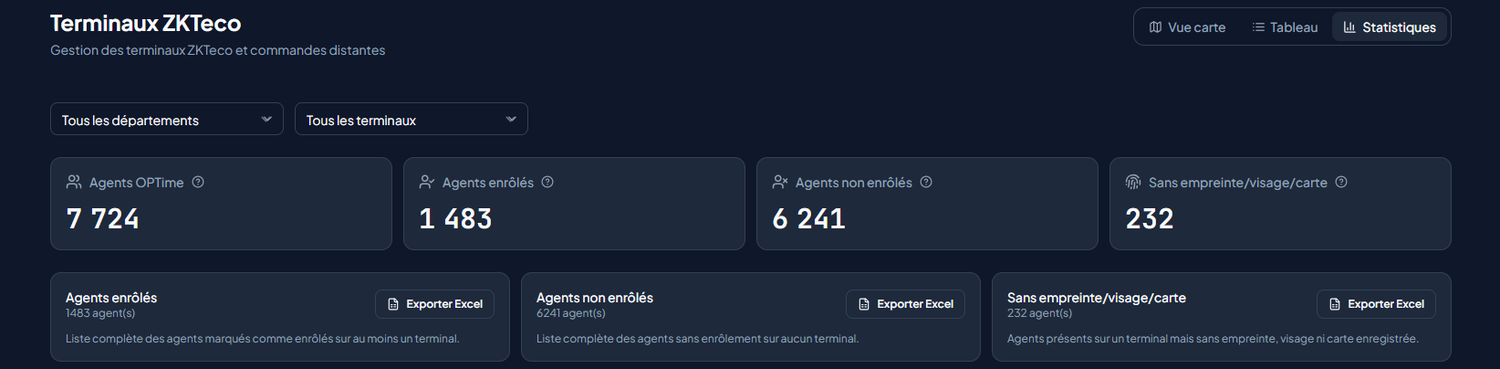
- Map view, table view and statistics view of the fleet
- Enrolment tracked terminal by terminal
Time and absence
- Schedules and rosters by department
- Leave requests and approval workflow
- Lateness, absence and overtime calculated from actual clock-ins
Payroll
- Salaries calculated from recorded attendance
- Payslips generated and archived
- Statements for accounting and statutory bodies
- Excel, PDF and CSV exports on every screen
Clocking in is not the real problem
OPTimes tells you who is not enrolled.
On a deployment of 7,724 staff, 6,241 were enrolled on no terminal at all and 232 appeared in the system with no fingerprint, face or card. Software that only counts the people who showed up leaves that hole wide open — and that is the hole the payroll leaks through. OPTimes measures it, lists it and exports it. That is where taking back control of a workforce actually starts.
Deployment
Six days, and your terminals run payroll.
A standard deployment, up to 500 staff and 5 terminals, is operational in under six working days, without interrupting activity.
- 01Day 1
We look at your fleet
Your terminals, headcount, schedules and pay scale. A one-hour conversation is enough to say what connects as it is and what needs hardware.
- 02Days 2 to 4
We configure and enrol
Server installed, terminals connected, schedules and pay scale configured. Fingerprint enrolment runs in parallel, department by department.
- 03Days 5 and 6
We train, then hand over
Two days of on-site training, online documentation, and dedicated support for the first six months.
Screenshots
What it looks like
Frequently asked questions
What management teams ask us.
How is salary calculated?
The engine combines your official pay scale (category, grade, step), the month's actual attendance, approved leave and closed missions, then applies income tax (IPR) in progressive brackets that you configure.
What happens when the power or the network goes down?
Clocking carries on. The terminal identifies the person and stores the clock-in in its memory; as soon as the link returns, it sends everything missing, with the real clock-in time. A record sent twice is counted once.
Is OPTimes suitable for a private company?
Yes. Pay scale, leave types, bonuses and tax brackets are configurable per entity. Private companies use it for attendance, overtime and payroll compliance.
What if we have several sites or entities?
A single instance runs several departments, campuses or subsidiaries, each with its own terminals, staff, pay scale and approval workflow. Their data never mix.
Where is our data hosted?
On your own servers, or with a host in the DRC. Fingerprints and payroll data never leave the country, and every creation, change or approval is written to the audit log.
Solutions
Our other products
 Higher education
The platform for universities and higher institutes.
Learn more → Primary and secondary schools
School fees, finally under control.
Learn more →OPOpSolverAttendance managementFingerprint clocking, even without internet.
Learn more → OPTGatewayOnline payments
Accept mobile money and cards with a single integration.
Learn more → Government project
Traceability for Kinshasa's number plates, in seconds.
Learn more →How many staff, across how many sites?
Give us the size of your workforce and the number of clocking points. You get a hardware sizing and a price back, not a brochure.